Basic Search
Search Performance :
- Open the website in your browser and ensure you are on the homepage.
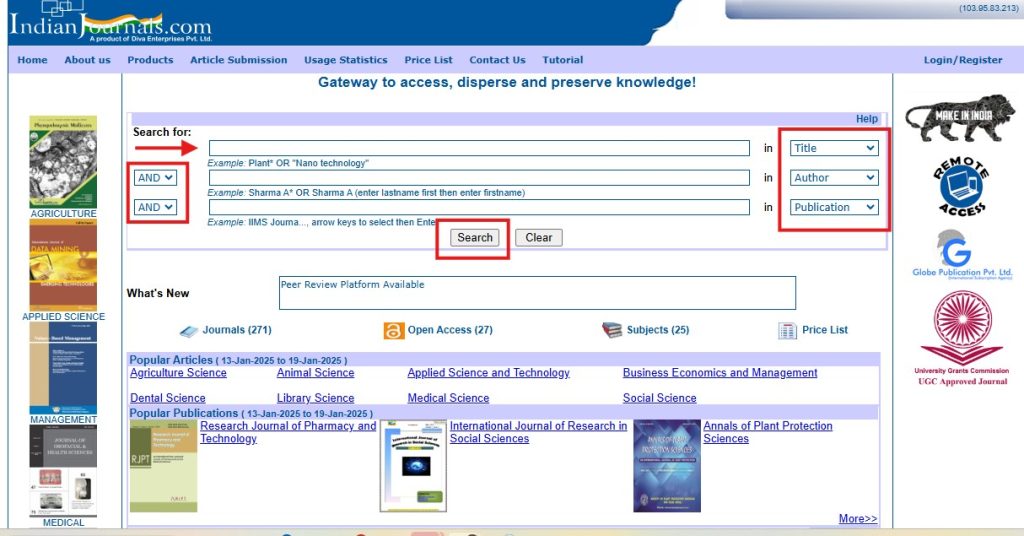
- On the homepage itself, you will find a search bar prominently displayed.
- In the first bar, you can enter the title of your query.
- Alternatively, use Boolean operators (e.g., AND, OR, NOT) to refine your search.
- You can also search using multiple criteria, such as:
- Author Name
- Publication Name
- Use the dropdown or other available filters to specify your search preferences.
- After entering your search criteria and refining the options, click on the Search button to initiate the search.
- The search results will be displayed, allowing you to browse and select the content relevant to your query.
Search Result :
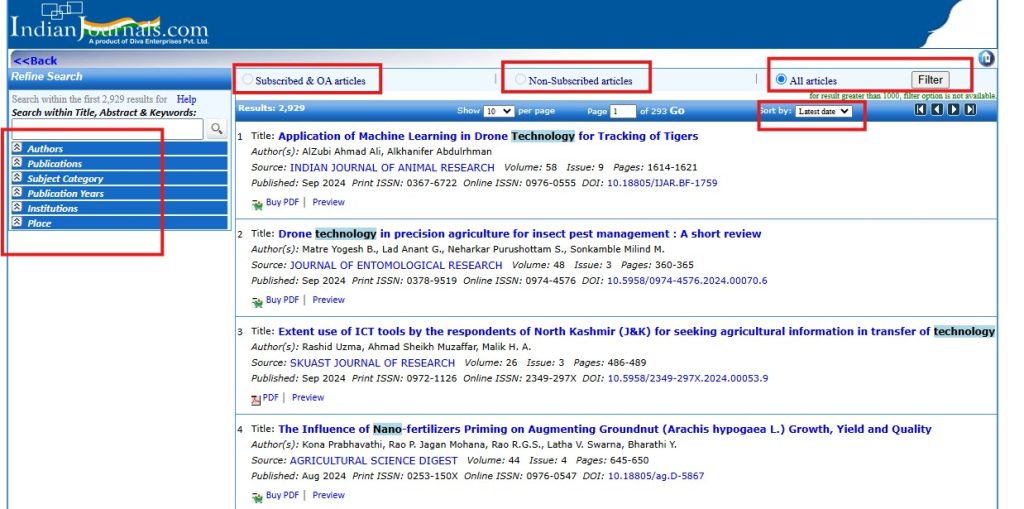
- After performing the search, the results will be displayed on the screen
- Review the list of search results to identify the content relevant to your query.
- Each result will display details such as the journal title, author, and publication date for better clarity.
- You can choose between the following options based on your requirement:
- Subscribed Journals
- Open Access (OA) Journals
- Non-Subscribed Journals
- All Journals
- On the left-hand side, you will find filter options to further narrow down your search.
- Filters may include:
- Journal type (e.g., OA, subscribed, etc.)
- Publication year or date range
- Subject area
- Author name
- Other criteria based on the website’s capabilities.
- Click on the title of an article to read it online.
- If the option is available, you can also download the article in PDF format for offline access.